
ADS EOS Extraoral Dental Suction System A122004

ADS EOS Extraoral Dental Suction System A122004
-
The EOS suction system-Aerosols and Droplets annihilator is designed and engineered to reduce droplet and aerosol spray that is an innate part of dental care. During dental procedures, Droplets and Aerosols are passed on to the dentist and staff's bodies. Patient care and the safety and health of the staff and the dentist is paramount, for the elimination of blood, aerosols and fine liquid particles. All of which are annihilated by the ADS EOS extraoral dental suction system.
- The ADS EOS extraoral dental suction system collects aerosols, droplets, dust and pathogens produced during routine dental procedures through a suction mouthpiece hood. Particulate matter is filtrated by the dust/particulate filter. The HEPA filter captures particles down to 0.3 microns with 99.995% efficiency. Clean dry air is exhausted from the base cabinet. The UVC lights are positioned on the HEPA filter and kill any remaining bacteria and viruses captured by the HEPA filter and are exhausted from the cabinet base. In ISO16890, European standard EN 1822:2009, EN 779:2012 and DOE-STD-3020-2015.
-
Specification for HEPA Filters Used by DOE Contractors, all mention HEPA filter H14 is a medical-grade filter that filters a minimum of 99.97% particles @ 0.3 microns (PM 0.3) or larger. With our special module design in the EOS Extraoral Suction System, fine filter, suction motor, UV light and HEPA filter are tightly buckled together into one metal module which is well sealed, this reliable structure helps to trap the dirty air inside, will not be leaked. In the article from CDC infection control online, mention the HEPA filter must be well sealed, a wooden or metal frame is required, a metal frame is much better. The ADS dental suction system is using a metal frame for a HEPA filter.
Features
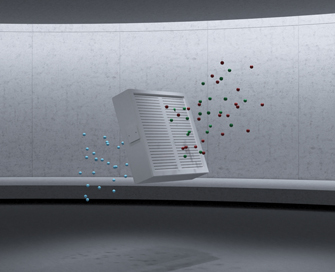
H-14 Hepa Filtration System: The 3 layered Hepa filtration system, stops virus and bacteria -> 0.3 microns with a 99.995% efficiency.
Precision Water Vaporization Filtering: Ensures the immediate drying in the cabinet base and emits clean dry air.
Medical Grade UV-C Light Disinfectant System: The UV-C light in coordination with the H-14 Hepa filter captures and kills bacteria, germs and virus.
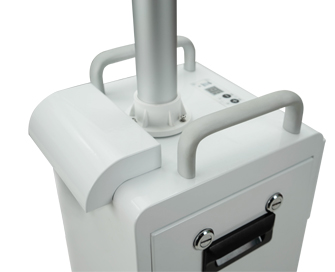
Rear Exhaust Design: Minimal noise reduction assuring patient and staff comfort. Assurance of clean bacteria and virus free dry exhaust.
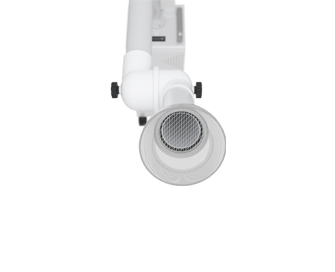
The Heart of the System: Engineering and Design dictated a reliable American made motor that includes advantages such as longevity, noise reduction, negative voltage which is tenfold of the suction power of the central negative voltage.
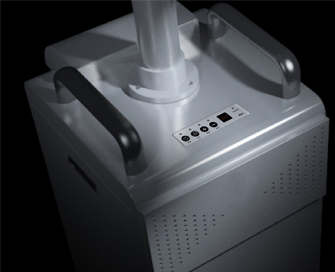
Precision Control System: Digitized display screen reads out 10 various levels of suction.
Monitoring of Filter Life: Digitized monitoring system displays the life expectancy of the Hepa filtration.
Dual-Use Modes: Level 1-3 is for air purification. Level 4-10 is for the capture aerosols, bacteria, droplets and splashing blood. Also used in the disinfecting mode.
Specifications
| Model | EOS Extraoral Suction System | |||
| Voltage | AC110V 60Hz | |||
| Electric current | 12-20A | |||
| Power | 1160W | |||
| Fuse wire | F25A 110 V | |||
| Flow | 105CFM | |||
| Suction Power | 23KPa (10 Different Levels) | |||
| Fine Filter | Average Efficiency (EM) for 0.4MM particles (%), 90<EM<95; Minimum efficiency* for 0.4MM particles (%) | |||
| HEPA Filter Level | H14 Class, blocking virus and germs >0.3nm with 99.995% filtration efficiency | |||
| Noise Decibel | 58dB (Tested under laboratory environment and 6-9 Inches distance from the suction mouthpiece hood) | |||
| Suction Arm Caliber | ©2" | |||
| UV Light Specifications | |||
| Type | uv-c | Lamp Tube Length | 5.3” |
| Lamp Tube Caliber | 0.6” | Lamp Cap Caliber | 0.7" |
| Wave Length | 254nm | Glass Tube | Ozone-free quartz glass |
| Power(W) | 4W | Voltage (V) | 30 士 15% |
| Electricity (mA) | 145 ± 15% | Radiation Intensity (piW/cm2) | >8 @39.4" |
| Steady time (min) | 5 | Average Lifetime (h) | >8000 (Continuous use) |
| Lamp Cap | G5 Aluminum head | Wire Material | Molybdenum Wire |
| Gas-filling | Pure Argon | Mercury | Pure Liquid Mercury<15mg |
ADS EOS Extraoral Dental Suction System A122004


Tilt angle (up/down): +90° ~ -35°
Tilt angle (up/down): +90° ~ -35°
